
The advent of the glass cockpit fundamentally changed aviation, and at its heart lies the Primary Flight Display (PFD). This integrated screen is the cornerstone of modern flight safety, transforming how pilots interact with their aircraft.
What is a Primary Flight Display?
The Primary Flight Display (PFD) is the central digital instrument pilots use to monitor and control an aircraft’s critical flight parameters. Found in aircraft equipped with Electronic Flight Instrument Systems (EFIS), it consolidates data traditionally split across multiple analog instruments onto a single, intuitive screen. It serves as the mission control center for flying the aircraft, providing real-time information on:
- Aircraft attitude (pitch and roll)
- Altitude and vertical speed
- Airspeed and heading
- Navigation status and autopilot modes
The Evolution from Steam Gauges to Glass
The shift from analog “steam gauges” to digital displays marked a technological revolution:
| Era | Technology | Key Advancements |
|---|---|---|
| Pre-1980s | Electromechanical | Separate “six-pack” instruments; high pilot workload |
| 1980s-1990s | Early Digital (EFIS) | CRT displays; basic integration; reduced clutter |
| 1990s-2000s | Mature Glass Cockpits | LCD screens; standard in business/general aviation |
| 2020s+ | Advanced Displays | Touchscreens; synthetic vision; head-up integration |
Early cockpits relied on vacuum-driven gyroscopes and mechanical linkages, which were prone to failures and required constant cross-checking. Modern LCD/LED PFDs provide seamless integration and near-instantaneous data synthesis.

Primary Functional Display Parts
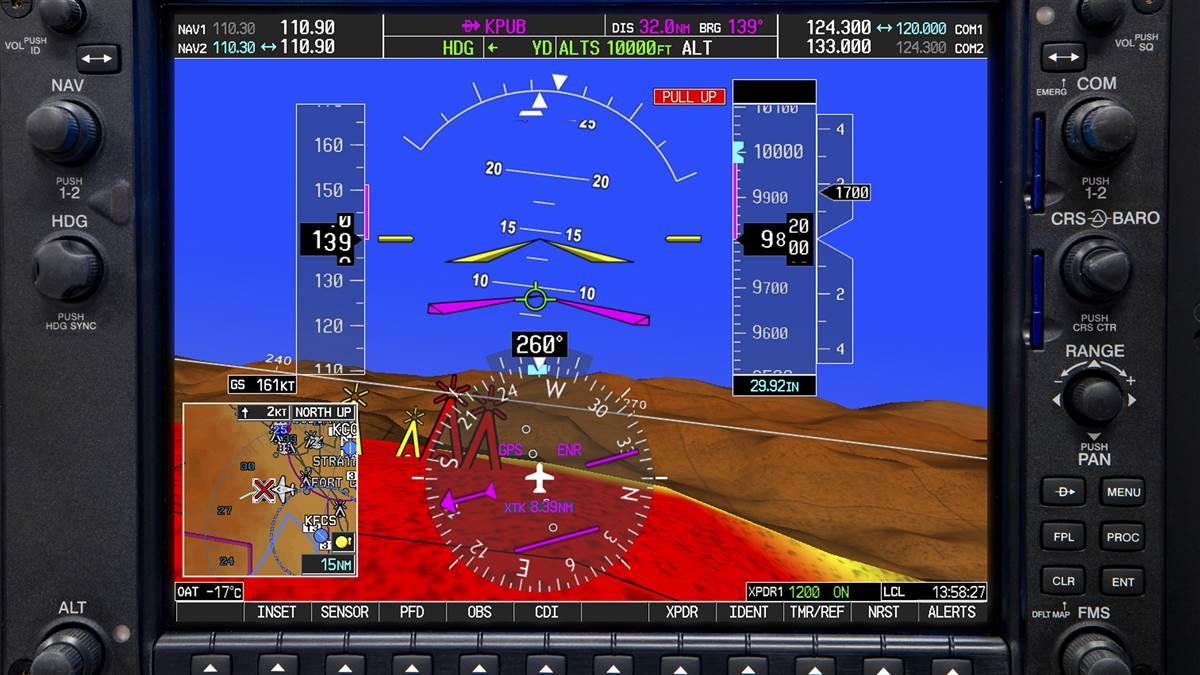
Core Components and Layout
- Central Attitude Indicator
- Shows pitch and roll against an artificial horizon
- Overlays flight director cues and ILS guidance needles
- Modern versions integrate Synthetic Vision (3D terrain mapping)
- Airspeed Tape (Left Side)
- Vertical scale showing indicated airspeed (IAS)
- Color-coded ranges: white (flap operations), green (normal), yellow (caution), red (never exceed)
- Includes trend vectors predicting speed changes
- Altitude Tape (Right Side)
- Displays barometric altitude with moving tape
- Shows radio altitude (height above terrain) during approaches
- Autopilot selected altitude markers
- Vertical Speed Indicator
- Located beside altitude tape
- Numeric display + trend indicator
- Heading/Navigation Section (Bottom)
- Compass rose with current heading
- Track vector and navigation deviation indicators
- Turn rate/slip-skid indicators
- Flight Mode Annunciations (Top)
- Shows active autopilot/autothrottle modes (e.g., “HDG”, “ALT”, “APP”)
- Alerting System
- Color-coded warnings: red (immediate action), amber (caution)
- Integrated terrain/traffic alerts
Why the PFD Transformed Aviation
- Enhanced Situational Awareness
- Integrates 10+ data points into a unified visual field
- Synthetic Vision creates 3D terrain maps in zero visibility
- 50% Reduced Workload
- Eliminates “instrument scan” mental fatigue
- Predictive trend vectors allow proactive control
- Safety Improvements
- 25% faster reaction time to emergencies
- Integrated terrain/traffic collision warnings
- Operational Efficiency
- Optimized flight profiles reduce fuel burn by 4-7%
- Precise navigation minimizes flight time
- Failure Resilience
- Dual independent screens in multi-crew aircraft
- Mandatory backup analog instruments
you’ll need this book before you start your Airbus A320 Type Rating “click here“

The PFD Ecosystem: Integration with Aircraft Systems
The PFD doesn’t operate in isolation. It synthesizes data from:
- Air Data Computers (airspeed/altitude)
- Attitude Heading Reference Systems (spatial orientation)
- Flight Management Systems (navigation)
- Weather Radar/Traffic Sensors
It works in tandem with the Multi-Function Display (MFD), which handles:
- Moving maps and weather data
- Engine performance monitoring
- Systems diagnostics
The Future of Primary Flight Displays
- Augmented Reality Integration
- Head-Up Displays (HUDs) project flight path onto windshields
- Conformal symbology aligns with real-world landmarks
- Touchscreen Revolution
- Gesture controls replacing physical buttons
- Customizable layouts for different flight phases
- Artificial Intelligence
- Predictive wind shear/turbulence alerts
- Automated emergency response suggestions
- Biometric Monitoring
- Pilot fatigue detection via eye-tracking
- Stress-level adaptive interfaces
Frequently Asked Questions (FAQs)
1. What’s the difference between a PFD and MFD?
- PFD: Critical flight control data (attitude, speed, altitude)
- MFD: Situational awareness tools (maps, weather, systems)
2. Can a PFD failure cause an emergency?
Modern aircraft feature triple redundancy:
- Dual PFD screens (captain/FO stations)
- Backup integrated standby instruments
- Required analog backups (altimeter/airspeed)
3. Are PFDs only in airliners?
No. Standard in:
- Commercial jets (Boeing, Airbus)
- Business aircraft (Cessna Citation, Gulfstream)
- General aviation (Cirrus SR22, Piper M600)
- Retrofit kits for older planes
4. Do pilots still train on analog instruments?
Yes. FAA/EASA require:
- 40+ hours on “steam gauges” for licenses
- Recurrent training on backup systems
5. How does synthetic vision work?
- Combines GPS, terrain databases, and attitude data
- Generates 3D runway/terrain images in fog or darkness
6. What causes “red X” symbols on a PFD?
Indicates sensor failure or data loss:
- Pitot-static system blockage
- AHRS/GPS signal loss
- Display processor failure
7. How much does a PFD system cost?
- Retrofit kits: $15,000–$50,000+
- New aircraft systems: Up to 8% of total cost


Leave a Reply