
By combining a heading indicator with a course deviation display, the HSI created an intuitive, map-like view of the aircraft’s navigational situation. It gave pilots an “out-the-window” perspective even when the actual window showed nothing but impenetrable cloud, fundamentally changing the safety and ease of instrument navigation.
What is an HSI
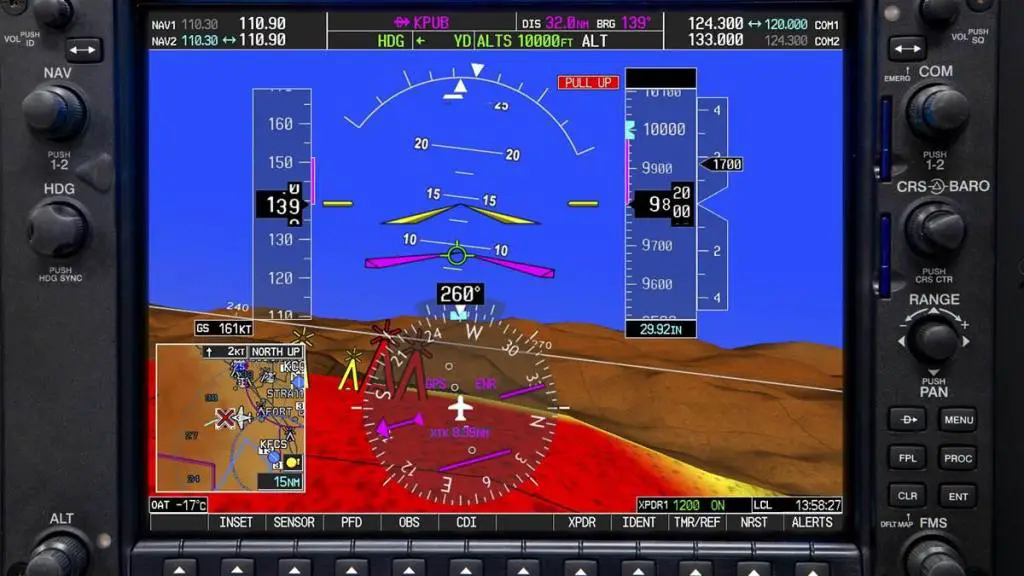
A Horizontal Situation Indicator (HSI) is an aircraft instrument that combines the functions of a heading indicator and a Course Deviation Indicator (CDI) into a single, integrated display. Think of it as a dynamic, moving map centered on your own aircraft. It shows you both your current situation (where you are, which way you’re headed) and your desired situation (where you want to go) in one intuitive picture.
This eliminates the mental gymnastics of cross-referencing multiple instruments, drastically reducing pilot workload and the potential for error.
Start your Airbus A320 Type Rating with this book “click here“
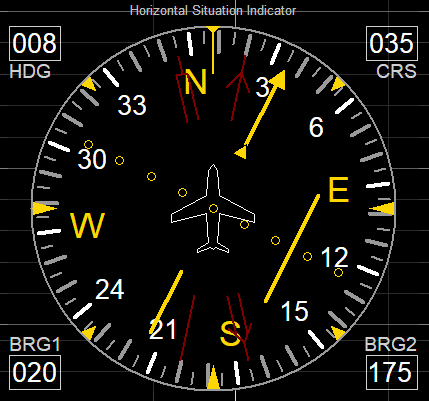
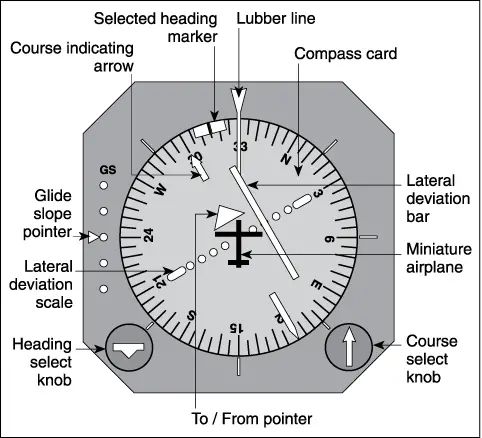
Parts of HSI
An HSI might look complex at first glance, but its components work together logically:
- The Rotating Compass Card: This is the base of the instrument, functioning just like a standard heading indicator. It shows the aircraft’s current magnetic heading, with the top of the instrument always representing “straight ahead.”
- The Lubber Line: A fixed line at the top of the display. The heading shown directly under this line is the aircraft’s current magnetic heading.
- The Aircraft Symbol: A fixed, typically triangle-shaped icon in the very center of the display, representing the nose of the aircraft. All other elements move relative to this fixed point.
- The Course Selector Arrow (or Course Pointer): This is a large, magenta-colored arrow that can be rotated by the pilot using the Course Select Knob. It represents the desired course or track the pilot wishes to fly.
- The Course Deviation Bar (CDI): This is the familiar vertical needle that moves left and right across the display. However, on an HSI, it is mechanically or electronically linked to the course selector arrow. The needle shows deviation relative to the selected course. If the needle is to the right, the course is to the right, and the pilot must fly right to intercept it.
- The TO/FROM Indicator: Small triangular flags (or arrows) that show whether flying the selected course would take the aircraft toward (TO) or away from (FROM) the navigation source.
- The Heading Select Bug: A smaller, manually set marker on the edge of the compass card used to select a specific heading for the autopilot to follow or for the pilot to reference.
The HSI in Action
The true power of the HSI is revealed when a pilot needs to intercept and track a course. Imagine you are vectored by Air Traffic Control onto a final approach course.
- Situation: You are flying a heading of 360° (North). The final approach course is 090° (East), and it is to your right.
- Action: You rotate the course selector arrow until it points to 090°. The TO/FROM indicator will show a “TO” indication.
- The Picture: You now see the entire situation at a glance. The course arrow is pointing to the right side of the instrument (East). The deviation bar is fully deflected to the right, because you are well to the left of the 090° course.
- The Interception: Instead of a complex mental calculation, you simply turn the aircraft until its nose is pointing toward the course arrow—in this case, you turn right to a heading of about 070-080°. As you fly toward the course, you will see the deviation bar begin to move from the right side of the display toward the center. When the bar is centered, you have intercepted the course and you turn to a heading of 090° to track it.
This visual, intuitive process is what makes the HSI such a powerful tool for efficiency and safety.
HSI vs CDI
While both instruments show course deviation, the HSI offers a quantum leap in situational awareness over a basic CDI.
| Feature | Traditional CDI | Horizontal Situation Indicator (HSI) |
|---|---|---|
| Display Type | Fixed | Dynamic, Pictorial |
| Heading Info | Requires separate heading indicator | Integrated into the display |
| Situational Awareness | Low. Requires mental fusion of heading and course data. | High. Shows the relationship between heading and course instantly. |
| Interception Ease | Difficult, especially for new pilots. Requires “mental math.” | Intuitive. The pilot simply flies toward the course arrow. |
| “Aircraft Symbol” | The entire instrument is fixed; the aircraft’s position is implied. | A fixed aircraft symbol is in the center; the world moves around it. |
In essence, a CDI tells you where the road is. An HSI shows you where the road is in relation to the direction you’re facing.
HSI in use
1. Intercepting and Tracking Courses
As described above, this is the HSI’s primary strength, used constantly during Standard Terminal Arrivals (STARs), Instrument Approaches, and en-route navigation.
2. Flying a Holding Pattern
Holding patterns require precise turns and course tracking. The HSI simplifies this by clearly showing the inbound and outbound legs relative to the aircraft’s heading, making it easier to execute the procedure correctly.
3. Flying DME Arcs
A DME arc requires the pilot to fly a curved path at a constant distance from a station. With an HSI, the pilot can set the course arrow to be tangential to the arc, providing clear guidance for when to begin and end turns.
4. Systems Monitoring
The integrated display allows pilots to quickly cross-check that the autopilot is following the correct course and that the navigation radios are tuned and identified correctly.
HSI FAQs
1. Is an HSI necessary to fly IFR?
No, it is not strictly necessary. Pilots have been flying IFR for decades with a standard CDI and a separate heading indicator. However, it is an immense aid that significantly reduces workload and improves safety, and it is standard equipment in virtually all modern commercial and business aircraft.
2. What is the most common pilot error with an HSI?
The most common error is misinterpreting the TO/FROM indicator or failing to set the course selector correctly. If the course arrow is set 180 degrees opposite to the intended direction, the deviation bar will command corrections that are exactly backwards, leading the pilot away from the desired course.
3. Can an HSI fail?
Yes. Like any complex instrument, it can fail. Modern systems are highly redundant, but pilots are trained to revert to basic “raw data” navigation using a standard CDI and magnetic compass if the HSI fails.
4. How do you set the course on an HSI?
The pilot uses the Course Select Knob (usually a large knob at the bottom of the instrument) to rotate the course selector arrow to the desired magnetic course.
5. What’s the difference between the Course Arrow and the Heading Bug?
The Course Arrow is linked to the navigation source (VOR or GPS) and shows the desired path over the ground. The Heading Bug is used to select a specific aircraft heading for the autopilot or as a visual reminder for the pilot.
6. Does the HSI work with both VOR and GPS?
Absolutely. Modern HSIs can display guidance from VORs, GPS, and even Instrument Landing System (ILS) localizers. The source is typically selected automatically by the flight management system or manually by the pilot.

 Aviator Tells
Leave a comment