
Imagine you’re a pilot flying through thick clouds, relying solely on your instruments to navigate. One tiny dial on your dashboard holds the key to staying on course: the OBS. But what exactly is this critical tool, and why do pilots swear by it? Let’s unravel the mystery of the Omni-bearing Selector (OBS) and its role in aviation safety.
Little introduction
In the world of aviation, even small instruments can make a life-or-death difference. The Omni-bearing Selector (OBS) is one such device—a humble knob on the cockpit panel that helps pilots track their position, follow airways, and land safely in low-visibility conditions.
This guide will demystify OBS, explain how it works, and answer your most pressing questions.
What is OBS in Aviation?
OBS (Omni-bearing Selector) is a cockpit instrument used primarily with the VOR (VHF Omni-directional Range) navigation system. It allows pilots to select a specific radial (a magnetic direction from a VOR ground station) and track their position relative to that path.
Think of it as a “radio compass” that guides pilots along invisible highways in the sky.

How Does OBS Work
- VOR Stations: Ground-based VOR transmitters send out 360 radio signals (radials) like spokes on a wheel.
- OBS Dial: The pilot rotates the OBS knob to select a desired radial (e.g., 180° for a southbound route).
- CDI (Course Deviation Indicator): A needle on the instrument shows whether the plane is left, right, or centered on the selected course.
- Tracking: Pilots adjust their heading to keep the needle centered, ensuring they stay on the correct path.
Why is OBS Important
- Precision Navigation: Critical for flying in poor weather or remote areas without GPS.
- Instrument Approaches: Guides pilots during landing when visibility is low.
- Backup System: Acts as a reliable backup if modern tech (like GPS) fails.
Key Components of the OBS System
- VOR Receiver: Picks up signals from ground stations.
- OBS Knob: Lets pilots “tune” into specific radials.
- CDI Needle: Visual feedback for course adjustments.
- TO/FROM Indicator: Shows whether the plane is moving toward or away from the VOR station.
If you are interested you should read about ADF (Automatic Direction Finder)

OBS vs. GPS: Which Do Pilots Use More?
While GPS is now the primary navigation tool, OBS remains vital for:
- Training purposes (most flight schools teach VOR/OBS navigation).
- Redundancy in case of electronic failures.
- Complying with older air traffic control procedures.
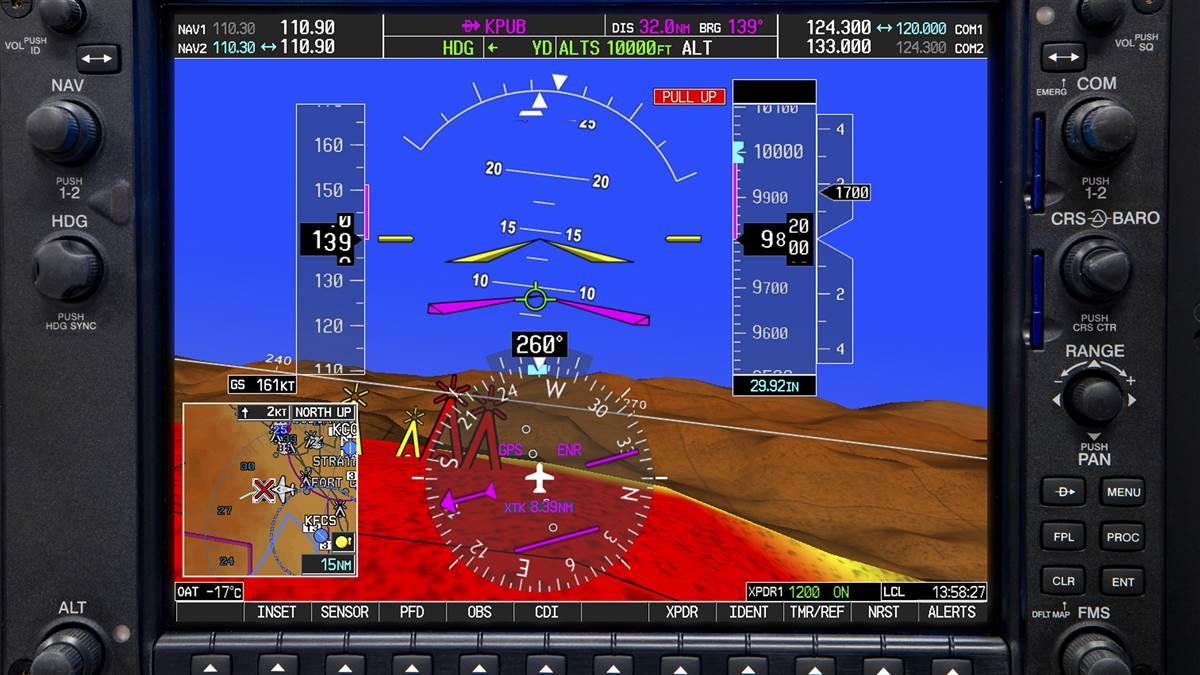
What is OBS Mode on the G1000?
The Garmin G1000 is a modern “glass cockpit” system that replaces traditional analog gauges with digital displays. But even in this high-tech environment, the OBS function remains vital. Here’s how it works:
Activating OBS Mode:
- On the G1000’s PFD (Primary Flight Display), pilots press the “CDI” or “OBS” softkey.
- This switches the navigation source from GPS to VOR, enabling manual radial selection.
- Using the knob or touchscreen, the pilot selects the desired radial (e.g., 360° for north).
How It Looks in Action:
- The selected radial appears as a magenta line on the moving map.
- The CDI needle (now digital) shows deviations, just like in traditional setups.
- The TO/FROM indicator is displayed electronically, often near the compass rose.
Why Keep OBS in a Glass Cockpit?
- Redundancy: If GPS fails, pilots can revert to VOR navigation.
- Training: Flight schools teach OBS/VOR skills, even in advanced aircraft.
- Procedures: Some air traffic control protocols still require VOR-based navigation.

OBS vs CDI: What’s the Difference?
While OBS and CDI are often mentioned together, they serve distinct roles:
- OBS (Omni-bearing Selector): This is the control used to select the desired radial. It’s like setting a destination on your GPS—you twist the knob to “tell” the system which path to follow.
- CDI (Course Deviation Indicator): This is the display that shows whether you’re on course. Imagine it as a compass needle that swings left or right to indicate deviations from your selected radial.
How They Work Together:
- The pilot uses the OBS knob to choose a radial (e.g., 270° for a westbound route).
- The CDI needle centers when the plane is aligned with that radial. If the needle moves left, the pilot turns left to re-center it, and vice versa.
- The TO/FROM indicator adds context: Are you flying toward the VOR station (TO) or away from it (FROM)?
FAQs About OBS in Aviation
1. What does OBS stand for in aviation?
OBS stands for Omni-bearing Selector, a tool used to select VOR radials for navigation.
2. How does OBS work with a VOR?
The OBS dial selects a VOR radial (e.g., 090° for an eastbound route), and the CDI needle shows deviations from that path.
3. Can you fly without an OBS?
Yes, but it’s risky in poor weather or over featureless terrain. Modern planes often integrate OBS with GPS for redundancy.
4. What’s the difference between OBS and HDG (Heading)?
- OBS sets a course relative to a VOR station.
- HDG sets the plane’s direction based on its compass.
5. Why does the OBS have a TO/FROM indicator?
It tells pilots whether they’re flying toward the VOR station (TO) or away from it (FROM), crucial for interpreting navigation data.
6. How do pilots troubleshoot OBS errors?
- Check VOR station reception.
- Recalibrate the OBS dial.
- Verify the CDI isn’t stuck or misaligned.
7. Is OBS still used with modern avionics?
Yes! While GPS dominates, OBS is still taught in flight schools and used as a backup system.
8. Can OBS be used for approaches?
Absolutely. Many Non-Precision Approaches (e.g., VOR approaches) rely on OBS for lateral guidance.
9. What happens if the OBS fails mid-flight?
Pilots switch to GPS, ATC vectors, or another VOR station. Redundant systems are mandatory for this reason.
10. How do I practice using OBS?
Flight simulators and training flights often include OBS/VOR navigation drills to build pilot proficiency.



Leave a Reply