
Weather is the single most critical factor in aviation safety. For pilots, understanding aviation weather reports like METAR (Meteorological Aerodrome Report) and TAF (Terminal Aerodrome Forecast) is essential for pre-flight planning and in-flight decision-making. These coded reports provide real-time and forecasted weather conditions at airports worldwide.
In this guide, we’ll break down how to read METAR and TAF reports step-by-step, decode their abbreviations, and use them to make informed decisions.
Why METAR and TAF Matter
- METAR: A snapshot of current weather conditions at an airport (updated hourly or as needed).
- TAF: A forecast of expected weather conditions over a 24–30-hour period.
- Both are standardized globally under ICAO (International Civil Aviation Organization) guidelines.
Without decoding these reports, pilots risk flying into dangerous conditions like thunderstorms, icing, or low visibility. Let’s dive in.

Section 1: How to Read a METAR Report
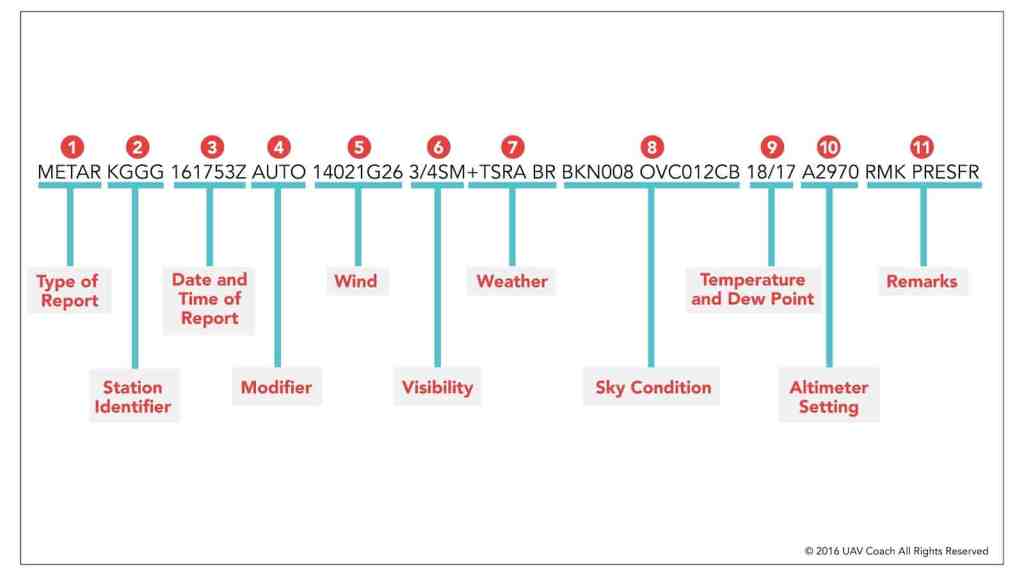
A METAR provides real-time weather data. Here’s the structure of a typical METAR:
Example METAR:KJFK 121551Z 33015G25KT 10SM -RA SCT030 BKN045 12/08 A2992 RMK AO2 PK WND 31027/1509
Breaking Down the METAR
- Station Identifier (e.g., KJFK):
- The 4-letter ICAO code for the airport (KJFK = New York’s JFK International).
- Date/Time (121551Z):
- Day of the month (12th) + time in UTC (1551 hours, or 3:51 PM). The “Z” stands for Zulu (UTC).
- Wind (33015G25KT):
- Wind from 330° at 15 knots, gusting to 25 knots.
- Visibility (10SM):
- Visibility = 10 statute miles. If reduced, it may show “1/2SM” for half a mile.
- Weather Phenomena (-RA):
- Light rain (“-” = light, “RA” = rain). Codes include:
- TS = Thunderstorm
- SN = Snow
- FG = Fog
- BR = Mist
- Light rain (“-” = light, “RA” = rain). Codes include:
- Cloud Layers (SCT030 BKN045):
- SCT030: Scattered clouds at 3,000 feet.
- BKN045: Broken clouds at 4,500 feet.
- Abbreviations: FEW (1–2 octas), SCT (3–4), BKN (5–7), OVC (8).
- Temperature/Dewpoint (12/08):
- Temperature = 12°C, Dewpoint = 8°C. Close values mean high humidity/fog risk.
- Altimeter Setting (A2992):
- Altimeter pressure = 29.92 inches of mercury (adjusts cockpit altimeter).
- Remarks (RMK AO2 PK WND 31027/1509):
- Additional info: Automated station with precipitation sensor (AO2), peak wind of 27 knots from 310° at 1509Z.
Section 2: How to Read a TAF Report
A TAF predicts weather for a specific airport over 12–30 hours.
Example TAF:TAF KJFK 121100Z 1212/1312 34012KT P6SM SCT025 BKN040 TEMPO 1212/1218 5SM -SHRA BKN020 FM121800 36018G30KT 3SM RA OVC015
Decoding the TAF
- Header (TAF KJFK 121100Z 1212/1312):
- Issued for KJFK on the 12th at 1100Z, valid from 12:00 UTC on the 12th to 12:00 UTC on the 13th.
- Wind Forecast (34012KT):
- Similar to METAR: Wind from 340° at 12 knots.
- Visibility (P6SM):
- “P” = “Plus,” meaning visibility exceeds 6 statute miles.
- Cloud Layers (SCT025 BKN040):
- Scattered clouds at 2,500 ft, broken at 4,000 ft.
- Temporary Changes (TEMPO 1212/1218 5SM -SHRA BKN020):
- Temporary conditions between 12:00–18:00 UTC: 5SM visibility, light showers (-SHRA), broken clouds at 2,000 ft.
- From (FM) Time Groups (FM121800…):
- Starting at 18:00 UTC on the 12th, expect wind 360° at 18G30KT, 3SM visibility, rain (RA), overcast at 1,500 ft.
Section 3: Common METAR/TAF Abbreviations
| Code | Meaning | Example |
|---|---|---|
| KT | Knots | 25010KT |
| SM | Statute Miles | 2SM |
| TS | Thunderstorm | TSRA |
| VRB | Variable Wind Direction | VRB05KT |
| CAVOK | Ceiling and Visibility OK | CAVOK |
Section 4: Practical Tips for Pilots
- Cross-Check METAR with TAF: Compare current conditions (METAR) with forecasts (TAF) to spot trends.
- Watch for Amendments: Look for “AMD” in TAFs, indicating updated forecasts.
- Focus on Critical Elements:
- Ceilings: Below 1,000 ft? Risk for VFR pilots.
- Wind Gusts: Exceeding crosswind limits for your aircraft?
- Thunderstorms (TS): Avoid convective weather.
Section 5: Tools to Decode METAR/TAF Automatically
While manual decoding is a must-learn skill, these tools save time:
- Aviation Weather Center (AWC): Provides decoded METAR/TAF maps.
- ForeFlight/Garmin Pilot: Apps that parse reports into plain English.
- Online Decoders: Try METAR Decoder.
Conclusion
Mastering METAR and TAF decoding is non-negotiable for safe flying. By understanding wind, visibility, clouds, and weather phenomena, pilots can avoid hazards and make smarter decisions. Bookmark this guide, practice with real-world examples, and always double-check forecasts before takeoff.
Pro Tip: For deeper learning, review FAA Advisory Circular 00-45H on aviation weather services.
FAQs
Q: What’s the difference between METAR and SPECI?
A: SPECI is a special report issued for sudden weather changes (e.g., fog forming rapidly).
Q: How often are TAFs updated?
A: Typically every 6 hours, but amended if conditions change.
Q: What does “VRB” mean in wind data?
A: Variable direction (e.g., VRB05KT = wind 5 knots from no fixed direction).
Q: Why is temperature/dewpoint important?
A: Close values = high humidity, risking fog or icing.
Q: How long is a METAR valid?
A: A standard METAR is valid for 1 hour (issued hourly), but airports may issue special reports (SPECI) if conditions change rapidly, like sudden fog or thunderstorms.
Q: What does “CAVOK” mean in a METAR?
A: CAVOK (Ceiling and Visibility OK) means visibility is ≥ 10 km, no clouds below 5,000 ft or the minimum sector altitude (whichever is higher), and no significant weather (e.g., rain, storms).
Q: What does “TEMPO” mean in a TAF?
A: TEMPO indicates temporary weather changes expected to last ≤ 1 hour (or ≤ 2 hours for 24-hour TAFs). For example, brief rain showers or gusty winds.
Q: What if visibility is missing in a METAR?
A: If visibility isn’t listed, it’s automatically 10 statute miles (SM) or more. If visibility drops below 10 SM, it will be explicitly stated (e.g., “3SM”).
Q: How are thunderstorms indicated in METAR/TAF?
A: Thunderstorms are marked as TS (e.g., TSRA = thunderstorm with rain). In TAFs, “PROB30” or “PROB40” may precede TS to indicate a 30–40% chance.


 Aviator Tells
Leave a comment